Guides
Rewarded Ads: Grant Tokens
Grant tokens only after the ad network confirms a completed rewarded ad. Keep the reward amount and transaction on the server so a modified client cannot award itself currency.
Create a Reward Transaction
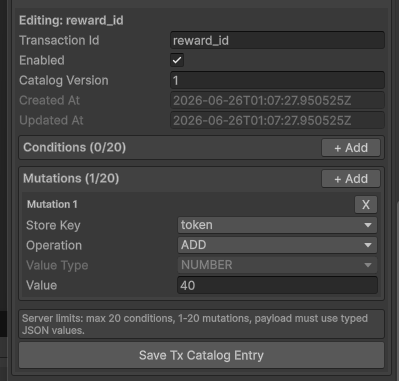
In Unity, open Tools → TurnKit → Configuration → Player Store Tx Catalog and create an enabled transaction named reward_id. Add one mutation: token → ADD → 40.
Validate Ad Completion Before Granting
Security rule: A client callback alone does not prove an ad was completed. If your ad provider offers server-side verification (SSV), validate its signed completion on a trusted backend and prevent replay before granting. Otherwise use the provider's documented server verification method. Never accept a client-supplied token amount or transaction ID as authorization.
Execute the Transaction
After trusted completion validation, execute the fixed transaction in the authenticated player context. Do not execute it directly from an unverified ad callback.
var result = await PlayerStore.Transaction("reward_id").Execute();Read Player Store for transaction behavior and Unity Client API for client integration.